
Fine-tune small language models with LoRA from R, by code or by drag and drop.
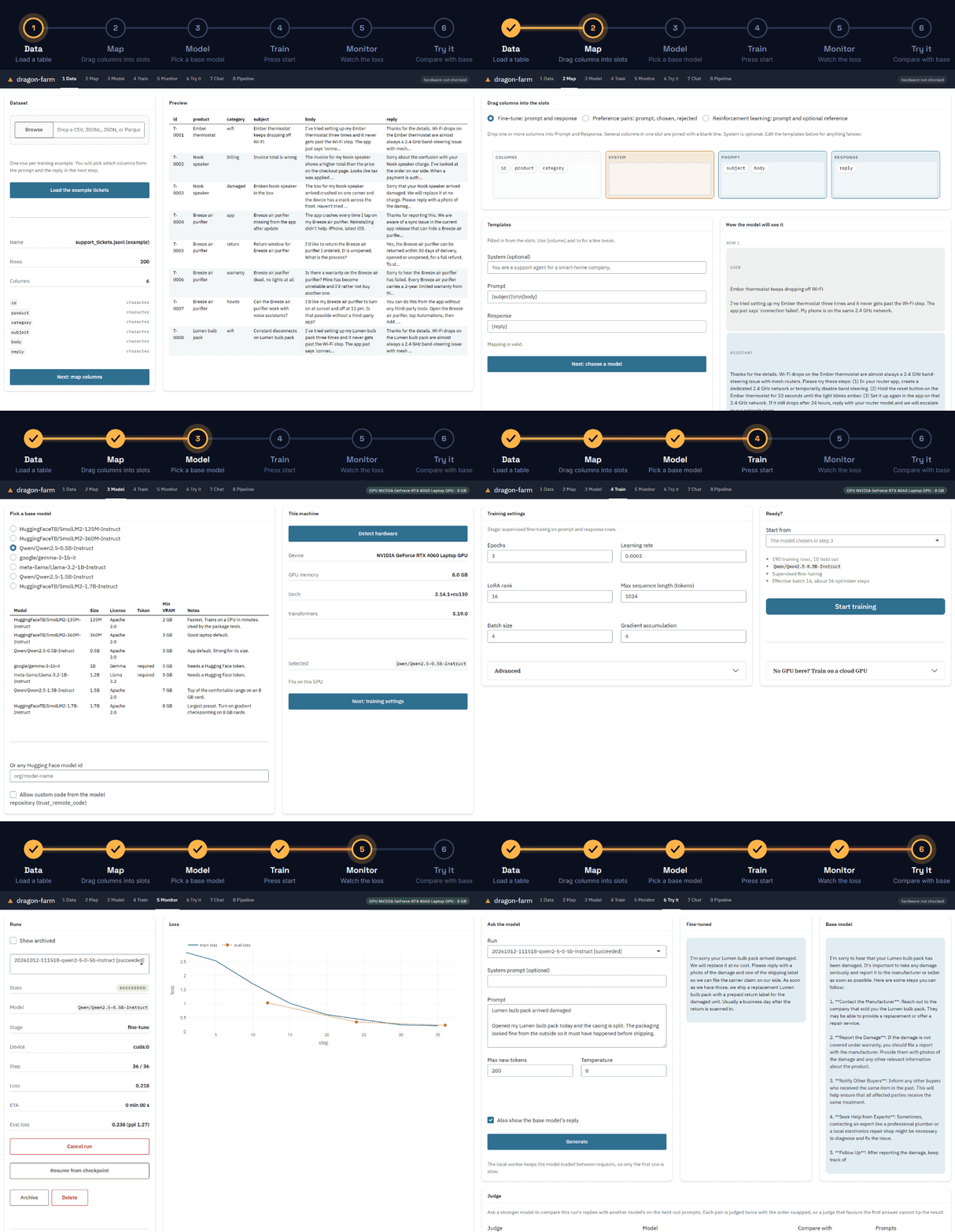
dragonfarm takes a table of prompts and replies, teaches a 100M to 3B parameter model to answer in your format and your domain, and gives you back an adapter or a merged model that loads with plain Hugging Face transformers. Training runs in a background Python process that the package sets up for you, on your own GPU or on a free cloud one.
The app walks through six numbered steps, the same ones as in the GIF above:
-
Data: load a table (CSV, TSV, JSON, JSONL, or Parquet, which needs the
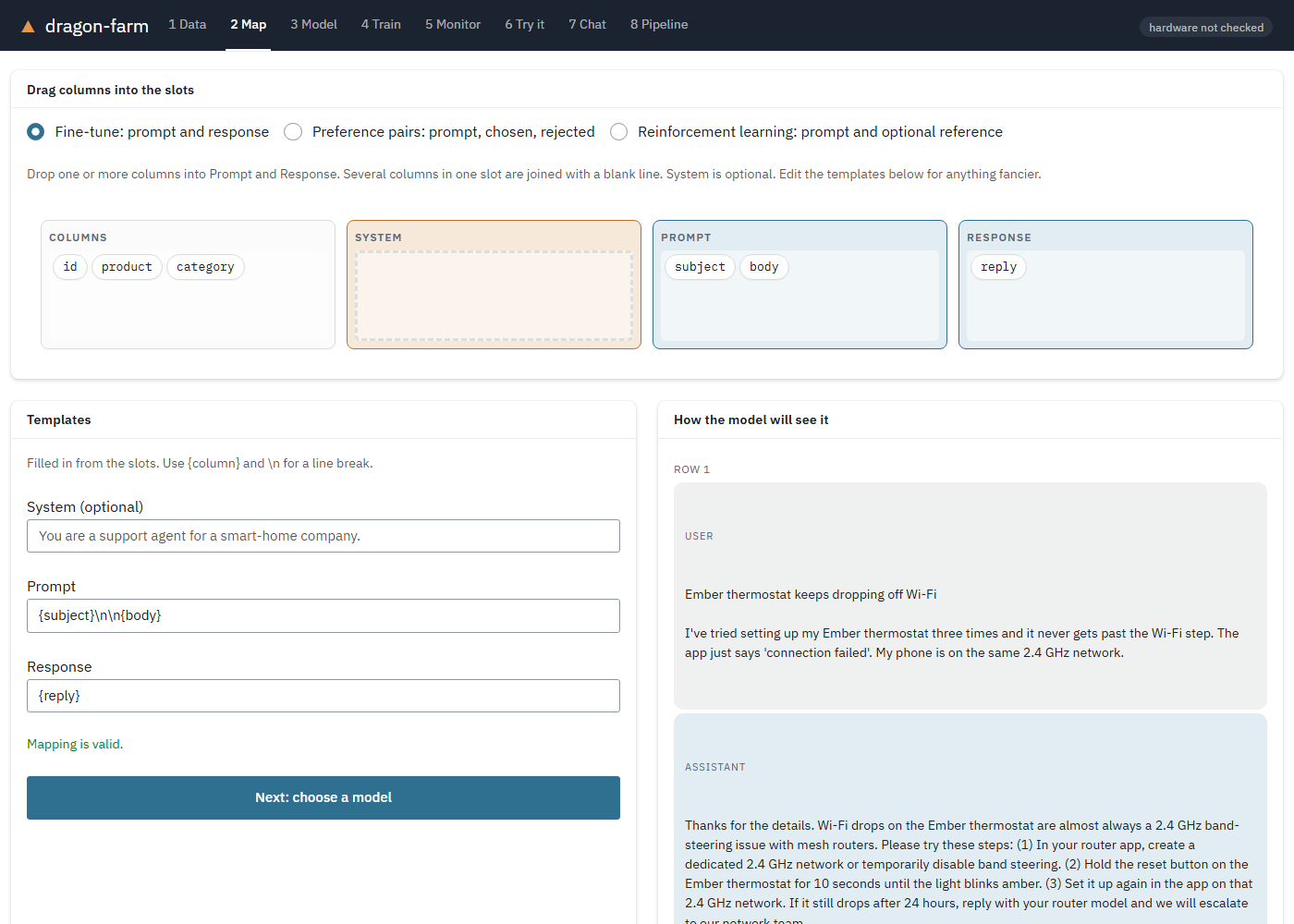
arrowpackage) or the example tickets. - Map: drag columns into the Prompt and Response slots.
- Model: pick a base model and check your GPU.
- Train: set a few numbers and press Start training, or send the run to a cloud GPU.
- Monitor: watch the loss curve; the panel also shows the R code that reproduces the run.
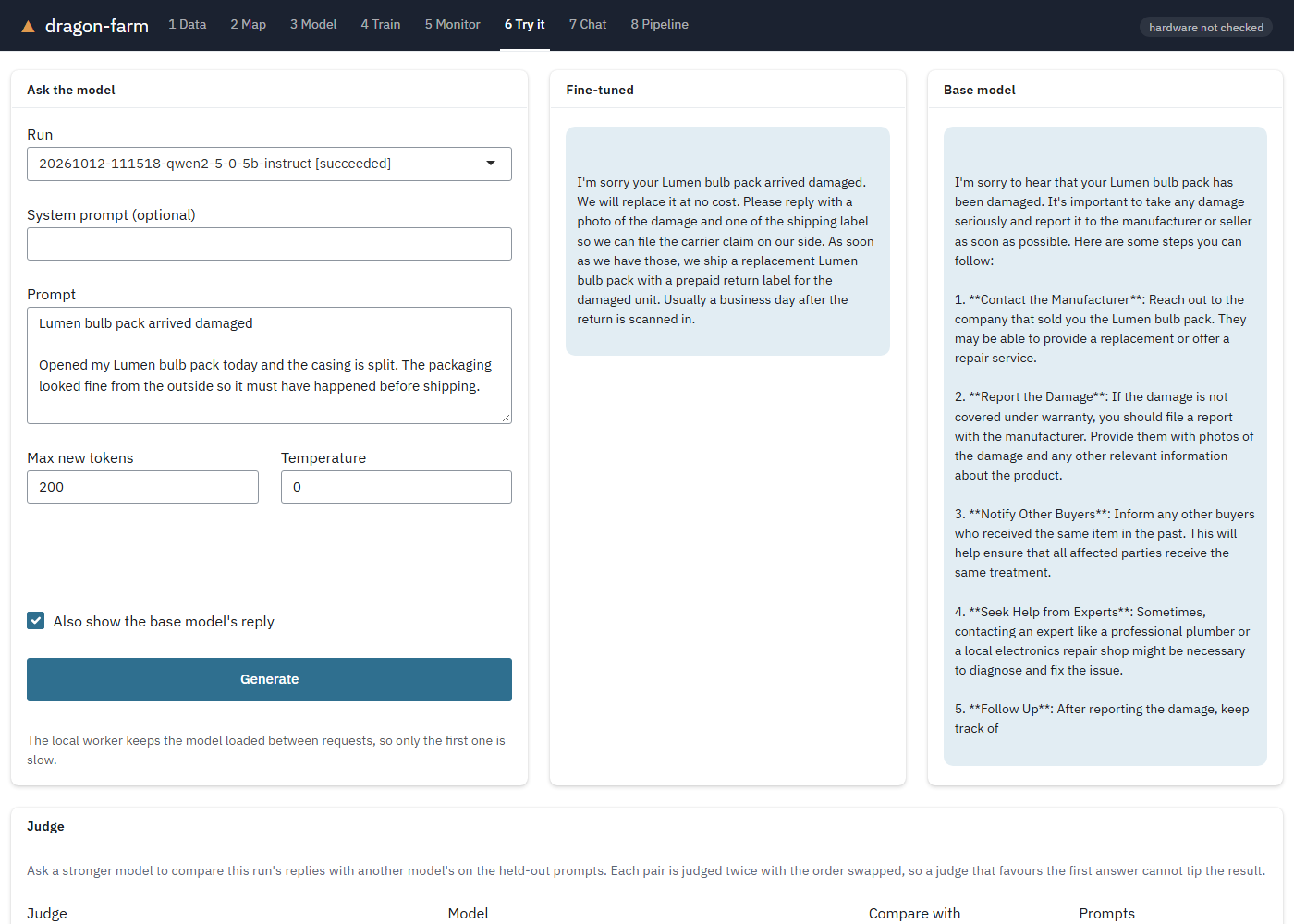
- Try it: compare the fine-tuned model with the base model, then judge, merge, or publish it.
Everything the app does is also available as R functions, shown below.
Before and after
Qwen/Qwen2.5-0.5B-Instruct, before and after fine-tuning on the package’s example support tickets (190 training rows; training takes about 2 to 4 minutes on a laptop RTX 4060 and about 4 minutes on a free Colab T4, after the one-time setup). Same ticket, temperature 0:
Ticket: Lumen bulb pack arrived damaged. Opened my Lumen bulb pack today and the casing is split. The packaging looked fine from the outside so it must have happened before shipping.
Base model: I’m sorry to hear that your Lumen bulb pack has been damaged. It’s important to take any damage seriously and report it to the manufacturer or seller as soon as possible. Here are some steps you can follow: 1. Contact the Manufacturer: Reach out to the company that sold you the Lumen bulb pack. They may be able to provide a replacement or offer a repair service. 2. Report the Damage: … (shortened)
After fine-tuning: I’m sorry your Lumen bulb pack arrived damaged. We will replace it at no cost. Please reply with a photo of the damage and one of the shipping label so we can file the carrier claim on our side. As soon as we have those, we ship a replacement Lumen bulb pack with a prepaid return label for the damaged unit. You do not need to wait for the return to arrive before the new one ships. Typical turnaround is 2 business days.
The example data is small, synthetic, and repetitive (many tickets recur with near-identical replies, and the held-out rows have near-copies in the training rows), so this shows a model picking up a house style and policy, not generalizing to new problems. Treat it as a demonstration of the workflow, and measure on your own data before trusting any output.
Install
install.packages("dragonfarm")   # from CRAN
library(dragonfarm)
dragon_check()                   # first run builds the Python environment: 2 to 3 GB
The development version: pak::pak("tejas4patel/dragon-farm").
The short version
library(dragonfarm)
options(dragonfarm.runs_dir = "~/dragonfarm_runs")   # keep runs after R closes; see Requirements

run <- dragon_dataset(dragon_example_data()) |>
  dragon_map(prompt = "{subject}\n\n{body}", response = "reply") |>
  dragon_train("Qwen/Qwen2.5-0.5B-Instruct", wait = TRUE)

dragon_generate(run, "My thermostat keeps dropping off Wi-Fi.")
dragon_merge(run, "models/support-0.5b")
dragon_train() returns immediately by default. Runs live on disk, so you can close R and come back:
run <- dragon_run("~/dragonfarm_runs/20260913-143201-qwen2-5-0-5b-instruct")
dragon_status(run)
dragon_progress(run)   # one row per logged step
dragon_wait(run)       # progress bar until it finishes
dragon_cancel(run)     # stops after the current step and saves a checkpoint
dragon_resume(run)     # picks up from that checkpoint
The app
The six steps above are the first six panels. Two more follow them: 7 Chat talks to a run with context and takes thumbs-up and thumbs-down feedback, and 8 Pipeline runs the whole post-training loop in one go. Every run started in the app is a normal run directory, and the Monitor panel shows the R code that reproduces it.
Requirements
- R 4.1 or newer.
- Disk: about 3 GB for the Python environment, plus 0.3 to 4 GB per model in the Hugging Face cache.
-
Python: nothing to install.
reticulateuses a Python 3.10 to 3.13 it finds on the machine, or downloads one. torch, transformers, and peft are installed automatically on first use. -
GPU training on NVIDIA: the only thing you install yourself is the NVIDIA driver, from nvidia.com/en-us/drivers. Driver 580 or newer gets the CUDA 13 build of torch, 570 or newer gets CUDA 12.8, and older drivers get CUDA 12.6. The CUDA Toolkit and cuDNN are not needed; torch wheels bundle their own CUDA libraries. Check your driver with
nvidia-smi. - Apple Silicon: trains on the GPU through Metal with no setup.
- No GPU: training runs on the CPU. Fine for the 135M and 360M models, slow beyond that.
Run dragon_check() after installing. It reports the device it will train on, and if that is the CPU on a machine with an NVIDIA GPU it says why (no driver, a driver too old for the installed torch, or a CPU-only torch build) and prints the one-line fix.
Where runs are stored. By default a run’s files (adapter, checkpoints, data, logs) go under a dragonfarm_runs folder inside a session temp directory, so a fresh R session never writes to your working directory or home filespace on its own; that folder disappears when the session ends. For runs you want to keep, set a real location once per project, before training anything:
options(dragonfarm.runs_dir = "~/dragonfarm_runs") # or any path you likeor set the DRAGONFARM_RUNS_DIR environment variable, or pass runs_dir = to dragon_train(), dragon_bundle(), dragon_app(), and the rest directly. See ?dragon_runs_dir.
Beyond fine-tuning: preference optimization
Fine-tuning teaches the model what a good reply looks like. The next stage teaches it which of two replies is better, from a table with a prompt, a chosen reply, and a rejected one. It runs on top of a fine-tuned run:
sft <- dragon_dataset("tickets.csv") |>
  dragon_map(prompt = "question", response = "answer") |>
  dragon_train("Qwen/Qwen2.5-0.5B-Instruct", wait = TRUE)

dpo <- dragon_dataset("preferences.csv") |>
  dragon_map_pairs(prompt = "question", chosen = "better", rejected = "worse") |>
  dragon_prefer(sft, method = "dpo", beta = 0.1, wait = TRUE)

dragon_evaluate(dpo)      # preference accuracy and reward margin on held-out pairs
dragon_generate(dpo, "My thermostat keeps dropping off Wi-Fi.")
Passing a run as the model chains the stages: the earlier adapters are folded into the weights before the new stage adds its own. method = "orpo" needs no reference model and can start from a base model directly. The app has the same path: choose “Preference pairs” in the Map panel and a run to start from in the Train panel.
Reinforcement learning with rewards you can check
When the goal is verifiable, a correct number, valid JSON, a format, a length budget, reinforcement learning beats preference data. The model writes several answers per prompt, the rewards score them, and it learns from the ones that beat their group’s average (GRPO):
math <- dragon_dataset("arithmetic.csv") |>
  dragon_map_prompts(prompt = "question", reference = "answer")

rl <- dragon_reinforce(
  math, sft,
  rewards = list(dragon_reward("numeric"), dragon_reward("length", max_chars = 300, weight = 0.2)),
  group_size = 6, wait = TRUE
)
dragon_evaluate(rl)   # mean held-out reward, per reward
Built-in rewards cover exact and numeric answers, regex and JSON formats, length, and keywords; a "custom" reward points at a Python function that sees the prompt, the completion, the reference, and the row’s other columns. It is the right tool for verifiable goals and the wrong one for vague ones; use dragon_prefer() for “be more helpful”.
Make the data: teachers and self-improvement
Small models are only as good as their training data, and most teams do not have a few hundred hand-written ideal replies. Two shortcuts:
# A stronger model answers your prompts; its replies become the training set.
teacher <- dragon_llm_anthropic(system = "You are a concise, warm support agent.")
synth <- dragon_synthesize(dragon_prompts(sft, "train"), teacher, system = "You are a concise, warm support agent.")
sft2 <- dragon_train(synth, "Qwen/Qwen2.5-0.5B-Instruct", wait = TRUE)

# The run answers each prompt four times, a judge scores every sample, and the
# best and worst become preference pairs. Then DPO on top of the same run.
pairs <- dragon_synthesize_pairs(dragon_prompts(sft2, "train", n = 200), student = sft2,
                                 judge = dragon_judge_anthropic(model = "claude-sonnet-5"))
dpo <- dragon_prefer(pairs, sft2, wait = TRUE)
dragon_judge(dpo, against = "base", judge = dragon_judge_anthropic())
That last sequence, sample, judge, train, judge again, is the loop that turns a fine-tune into a development cycle. The app’s Try it panel has the same Improve step.
Talk to it, anywhere it runs
Training machines are rarely the right inference machines. Generation goes through a backend you choose:
chat <- dragon_chat(run, system = "You are a concise support agent.")
chat$say("My thermostat keeps dropping off Wi-Fi.")
chat$say("I tried that. What else?")        # the model remembers the first exchange

backend <- dragon_serve_ollama(run)          # merge, register with Ollama, done
options(dragonfarm.backend = backend)        # every call now uses Ollama
dragon_generate(run, "Hello")

vllm <- dragon_backend_server("https://my-pod.example.com/v1", model = "me/support-0.5b")
dragon_chat(backend = vllm)$say("Hello")
The default backend is a local worker that keeps the last two models loaded, so judge and synthesis loops stop paying a model load per call. The app’s Chat panel offers the same choice of backend.
Conversations are also where human feedback comes from. Rate a reply, fix it, and the verdict is saved; dragon_feedback() turns the verdicts into data for the next stage:
chat$rate("down")
chat$regenerate()
chat$rate("up")
chat$edit("Hold the recessed button on the back for ten seconds.")

fb <- dragon_feedback()
better <- dragon_train(fb$sft, dpo, wait = TRUE)      # liked and edited replies, with context
dpo2 <- dragon_prefer(fb$pairs, better, wait = TRUE)  # liked versus disliked replies to the same prompt
Whole conversations work as training data too: dragon_conversations() takes a list of message lists or a JSONL file of them.
The whole loop in one call
p <- dragon_pipeline("Qwen/Qwen2.5-0.5B-Instruct", list(
  dragon_step_train(tickets),
  dragon_step_synthesize_pairs(prompts = "train", n = 150, judge = dragon_judge_anthropic(model = "claude-sonnet-5")),
  dragon_step_prefer(method = "dpo"),
  dragon_step_judge(against = "base", judge = dragon_judge_anthropic()),
  dragon_step_evaluate(metrics = c("token_f1", "length_ratio"))
), background = TRUE)

dragon_pipeline_status(p)   # step by step, while it runs
dragon_compare(p)           # its runs side by side, when it is done
The app’s Pipeline panel runs the same recipe and draws the lineage of every run in the directory.
Did it help? Metrics, judges, and comparisons
Held-out loss says a stage trained. It does not say the replies got better. Three tools answer that:
# Deterministic checks over every held-out row
dragon_evaluate(dpo, metrics = c("exact", "token_f1", "json_valid"))

# A stronger model as judge: did DPO beat the fine-tuned run it started from?
dragon_judge(dpo, against = "base", judge = dragon_judge_anthropic())
#> dpo vs sft on 20 prompts: wins 65% · ties 25% · losses 10%

# Or absolute scores against your own rubric, with a local judge
dragon_judge(sft, judge = "Qwen/Qwen2.5-1.5B-Instruct",
             rubric = "Reward concrete next steps; penalise anything over 120 words.")

# Everything the package knows about every run, side by side
dragon_compare()
Pairwise judging asks each question twice with the replies swapped, so a judge that favours whichever answer comes first yields ties, not wins. dragon_judge_anthropic() reads ANTHROPIC_API_KEY; dragon_judge_ellmer() accepts any ellmer chat for other providers.
No GPU? Train in the cloud
The run directory is the whole contract between R and the trainer, so a run can be trained on any machine with a GPU and its results copied back. dragon_bundle() zips the run, dragon_remote() opens a provider with the dragon-farm notebook and prints the steps, and dragon_import() puts the trained adapter into place. Nothing else changes: dragon_generate() and dragon_merge() work on the imported run as if it had trained locally.
run <- dragon_dataset(dragon_example_data()) |>
  dragon_map(prompt = "{subject}\n\n{body}", response = "reply") |>
  dragon_bundle("Qwen/Qwen2.5-0.5B-Instruct")

dragon_remote(run, "colab")   # opens Colab with the notebook, prints the steps
# ... upload the zip it names, Run all, download dragonfarm-results-<id>.zip ...
dragon_import(run, "~/Downloads/dragonfarm-results-<id>.zip")| Provider | Cost | What the link opens |
|---|---|---|
| Google Colab | Free tier with a T4; paid tiers for longer sessions | The notebook, directly |
| Kaggle | Free: about 30 GPU hours a week (T4 x2 or P100) | The notebook, directly |
| Lightning AI | Free monthly credits, then pay as you go | The dragon-farm repo in a new Studio |
| RunPod | Pay per hour, wide choice of GPUs | The RunPod console |
The app has the same path: the Train panel’s “No GPU here?” section prepares the bundle and gives you the download and the provider link, and the Monitor panel imports the results zip. dragon_check() points here when it finds no GPU, and a run that failed locally for lack of memory can be sent to the cloud as is with dragon_remote(run, ...).
What you get from a run
| File | Written by | Contents |
|---|---|---|
config.json |
R | Everything the trainer needs. |
data/train.jsonl, data/eval.jsonl
|
R | Rows in chat format. |
status.json |
Python | State, device, parameter counts, final metrics. |
progress.jsonl |
Python | Loss, learning rate, and ETA per logging step. |
adapter/ |
Python | The LoRA adapter, loadable with peft. |
checkpoints/ |
Python | The last two checkpoints, for resume. |
eval.json, samples.json
|
Python | Held-out loss and sample generations. |
merged/ |
Python | After dragon_merge(): a standalone model. |
Models that work well
| Model | Size | License | Needs a token | Min GPU memory |
|---|---|---|---|---|
HuggingFaceTB/SmolLM2-135M-Instruct |
135M | Apache 2.0 | no | 2 GB, or CPU |
HuggingFaceTB/SmolLM2-360M-Instruct |
360M | Apache 2.0 | no | 3 GB |
Qwen/Qwen2.5-0.5B-Instruct |
0.5B | Apache 2.0 | no | 3 GB |
google/gemma-3-1b-it |
1B | Gemma | yes | 5 GB |
meta-llama/Llama-3.2-1B-Instruct |
1.2B | Llama 3.2 | yes | 5 GB |
Qwen/Qwen2.5-1.5B-Instruct |
1.5B | Apache 2.0 | no | 7 GB |
HuggingFaceTB/SmolLM2-1.7B-Instruct |
1.7B | Apache 2.0 | no | 8 GB |
dragon_presets() returns this table. Any other causal language model on the Hugging Face Hub works too. For gated models, accept the license on the Hub and set HF_TOKEN in the R session.
How it works
R never imports torch. It writes a run directory and launches python -m dragonfarm.train as a subprocess with processx. The trainer is Hugging Face transformers with peft for LoRA and a prompt-masking collator so only the reply tokens contribute to the loss. Progress comes back through files, which is what lets the Shiny app poll it and lets a run outlive the R session.
The Python side (inst/python) is also its own installable package (pip install ./inst/python, soon pip install dragonfarm once it’s on PyPI): a dragonfarm command (check, train, generate, pack) and a dragonfarm.api module for reading a run directory from plain Python, no R required. A run started from R can be inspected or continued from Python and back, since both read and write the exact same files.
Development
devtools::test()                                  # unit tests, no Python needed
Sys.setenv(DRAGONFARM_INTEGRATION = "true")
devtools::test(filter = "integration")            # trains SmolLM2-135M for 6 steps
The Python side has its own tests: PYTHONPATH=inst/python python inst/python/tests/run.py (or python -m pytest inst/python/tests if pytest is installed).
Environment variables
| Variable | Effect |
|---|---|
DRAGONFARM_PYTHON |
Use this interpreter instead of the one reticulate builds. It must already have the packages from dragon_python_requirements(). |
DRAGONFARM_TORCH_INDEX |
Windows only. auto (default) selects the CUDA wheel index matching your NVIDIA driver on first Python use. Set to "" to use PyPI’s CPU build, or to another index URL. |
DRAGONFARM_RUNS_DIR |
Where runs are stored. Defaults to dragonfarm_runs under a session temp directory; see Requirements for a persistent location. |
HF_TOKEN |
Hugging Face token for gated models. |
LLAMA_CPP_DIR |
A llama.cpp checkout, for dragon_export_gguf(). |